
How can we help?
Squawker Online
Squawker PC Manual
- The Main Window at a Glance
- Connect Panel - Managing Scanner/Radio Profiles
- Range Search - Filtering by Location
- The Aviation Tab - Quick Reference Lookups
- Select Database - Switching Between Datasets
- The Select Panel Toolbar - Filtering & Selecting Rows
- The Export Panel - Programmer & File Exports
- The General Panel - Reference Tools & Live Windows
- The Squawker Connect Window - Layout Overview
- Live Scan - Matching a Received Frequency
- Radio Controls - Uniden Models Only
- Log History - All Entries, Unique Frequencies & Managing Your Log
- Adding Notes to a Frequency
- Auto Submit & Manual Submit
- Exporting Your Connect Log
- Recording Audio of Logged Transmissions
- Recording Folders - Standard vs Extended, and How Groups Are Named
- Playing Back, Finding & Deleting Recordings
- Programmer Screen at a Glance
- UBC125XLT/C Programmer - Overview & Getting Connected
- Filling a Bank — The Data Dropdown, Categories & the Overwrite Prompt
- Quick Fill - Auto-Populating Banks Near Your Location
- Editing, Sorting & Deleting Channels
- Reading, Backing Up & Restoring
- Writing to Your Scanner
- SDS100/SDS200/UBCD3600XLT Programmer Screen at a Glance
- SDS100/SDS200/UBCD3600XLT Programmer - Overview & Getting Connected
- Filling a Favorites List - The Data Dropdown, New Favorite & Add To
- Quick Fill - Auto-Populating a Full Set of Favorites Lists Near Your Location
- Editing, Sorting & Deleting - Favorites Lists, Systems, Departments & Channels
- Reading, Backing Up & Restoring
- Writing to Your Scanner - Mass Storage Mode
- BCT15X/UBC3500XLT/UBC800XLT Programmer Screen at a Glance
- BCT15X/UBC3500XLT/UBC800XLT Programmer - Overview & Getting Connected
- Model Differences - BCT15X, UBC3500XLT & UBC800XLT
- Filling Systems & Groups - Quick Fill, the Data Dropdown & Add To
- Editing, Sorting & Deleting Systems, Groups & Channels
- Reading, Backing Up & Restoring
- Writing to Your Scanner
- BCD160DN/BCD260DN Programmer Screen at a Glance
- BCD160DN/BCD260DN Programmer - Overview & Getting Connected
- Filling a Bank - The Data Dropdown & the Overwrite Prompt
- Quick Fill - Auto-Populating Banks Near Your Location
- Editing, Sorting & Deleting Channels
- Reading, Backing Up & Restoring
- Writing to Your Scanner
Interactive Map
WTRBrowser
Active Mil
UKAFG Printed Guide
Scanner Manuals
- Overview & What's in the Box
- Controls, Display & Turning It On
- Basic Settings
- Understanding Scanning, Searching & Banks
- Programming Channels Manually
- Scanning & Priority Modes
- Service, Custom & Quick Search
- Close Call RF Capture
- Reference & Connecting to a Computer
- Common Questions & Troubleshooting
Band, ATIS & Havequick
Once you have a set of results, use the filter controls above the table to narrow what’s displayed — these apply instantly to the current results without re-running the search.
Band Filter
Switch between All bands, VHF (the civil airband, 118–137 MHz), or UHF (the military airband, 225–400 MHz) to focus on one or the other.
Exclude ATIS / Exclude Havequick
Two checkboxes let you hide specific frequency types from the results:
- Exclude ATIS — hides automated terminal information broadcast frequencies.
- Exclude Havequick — hides military frequency-hopping (Havequick) channels.
Both filters can be combined with the band filter, and update the results table immediately.
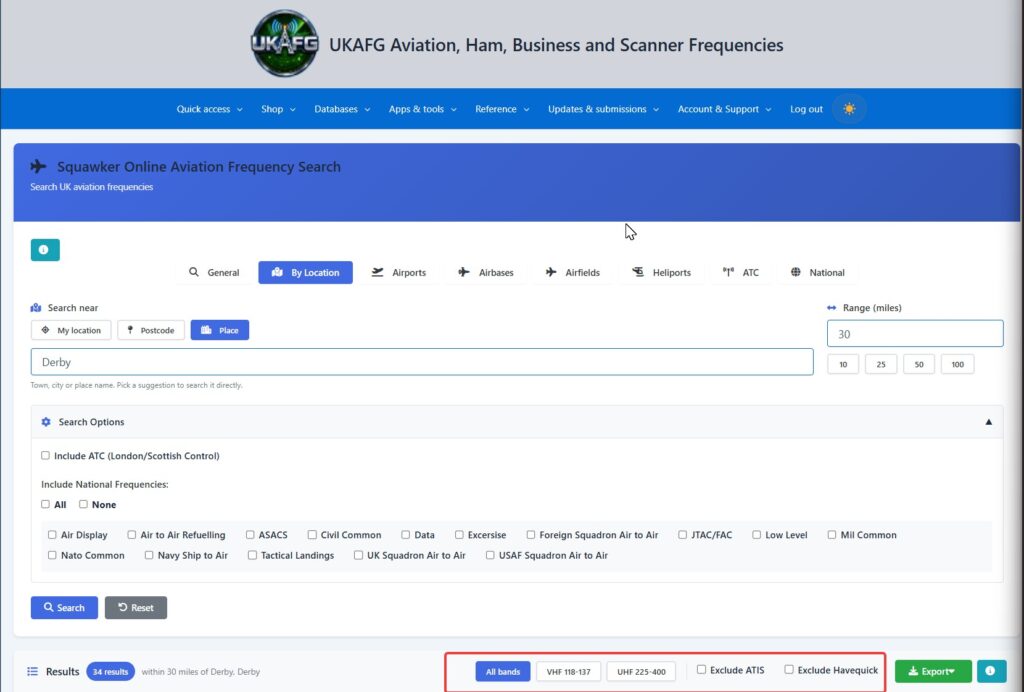
Table of Contents